Dashlane's .dash archive and CSV ZIP
The encrypted .dash keeps the structure and dates that the five-CSV ZIP flattens.
Checked against Dashlane web app 6.2637.0 export Sources: Dashlane: Export your data to a secure DASH file
Dashlane's best export is also its least portable: almost nothing outside Dashlane opens a
.dash, which is awkward when you are trying to leave. We exported one vault both ways
and unzipped the CSVs.
| Form | File | Encrypted |
|---|---|---|
| Secure Export A text wrapper around one encrypted, deflated XML document. The richest form, and the only one carrying the card brand, per-record timestamps, and collection membership as real references. | *.dash |
Yes |
| ZIP of CSVs Five CSVs, one per category, named by category. Plaintext. | *.zip |
No |
| Single CSV Not a form Dashlane produces, but the one people bring: the archive gets unzipped and one file handed over. Each of the five is recognized on its own by a column no other Dashlane export has. | credentials.csv and four others |
No |
Buddy reads both. The Secure Export is the better file whenever the tool on the other end can open it.
How to export
Both exports live under the account dropdown, then Settings, then Export data. Dashlane asks for your master
password first, which unlocks exporting for five minutes. Choosing CSV produces the ZIP. Choosing
DASH also asks for a transport passphrase, which becomes the password on the .dash.
Only the .dash is encrypted. Unzipping the CSV archive leaves a second plaintext copy
of your vault next to the first, and both need deleting.
Secure Export format
The envelope
A .dash opens fine in a text editor. It is a plain-text wrapper with named sections
marked by dashed BEGIN and END lines, and one of them holds a base64 blob:
---------- Dashlane Secured Export ----------
---------- Data BEGIN ----------
JDEkYXJnb24yZCQxNiQzJDMyNzY4JDIkYWVzMjU2JGNiY2htYWMkMTYk...
---------- Data END ----------
Decode that and the first thing in it is its own parameter list, in the clear:
$1$argon2d$16$3$32768$2$aes256$cbchmac$16$Read left to right: Argon2d, 16-byte salt, 3 iterations, 32768 KiB of memory, 2 lanes, then AES-256 in CBC with an HMAC and a 16-byte IV. Because the file states its own parameters, an export made after Dashlane raises the cost still opens. Immediately after the prefix come the salt, the IV, a 32-byte MAC and the ciphertext, in that order.
One Argon2d pass over your export password gives a 32-byte secret, and the SHA-512 of that secret splits down the middle into the cipher key and the MAC key. The MAC covers the IV and the ciphertext and is checked before anything is decrypted. It is a good design: a wrong password fails cleanly and immediately, instead of surfacing later as a corrupt-padding error or, worse, as plausible-looking garbage.
Deflated XML
The decrypted plaintext is not the document. Four bytes come first, and the deflate stream begins after them:
[00 00 07 59][zlib stream ...][block padding]
Older exports put the stream's big-endian length in those four bytes. Exports made in September 2026
write zeros there, so an importer that trusts the length inflates nothing. Skip the four bytes and
let zlib find the end of its own stream, which steps over the CBC block padding as well. Inflate it
and you get an XML document whose records are elements tagged KWAuthentifiant
for a login, KWSecureNote, KWPaymentMean_creditCard,
KWBankStatement, KWAddress and a handful of identity document types.
Collections
A KWCollection element names the records that belong to it. The records themselves say
nothing about which collections they are in. To find out what any single entry is tagged with, you have to read
every collection in the document first and invert the whole set. The members are also nested one
level deeper than you would expect, inside their own list element, so walking only a collection's
direct children finds nothing.
A login and the collection it belongs to, with Dashlane's bookkeeping keys left out. The only link
between them is the login's Id, repeated inside the collection:
<KWAuthentifiant>
  <KWDataItem key="Id"><![CDATA[{8E1F4C2A-0B7D-4E91-A3C6-5D2F9B8E7A10}]]></KWDataItem>
  <KWDataItem key="Title"><![CDATA[Example Mail]]></KWDataItem>
  <KWDataItem key="Login"><![CDATA[jane@example.com]]></KWDataItem>
  <KWDataItem key="Password"><![CDATA[correct-horse-battery]]></KWDataItem>
</KWAuthentifiant>

<KWCollection>
  <KWDataItem key="Id"><![CDATA[{3B9D7E15-6C2A-4F80-B1D4-9E7A2C5F0D63}]]></KWDataItem>
  <KWDataItem key="Name"><![CDATA[Work]]></KWDataItem>
  <KWDataList key="VaultItems">
    <KWDataCollection>
      <KWDataItem key="Id"><![CDATA[{8E1F4C2A-0B7D-4E91-A3C6-5D2F9B8E7A10}]]></KWDataItem>
      <KWDataItem key="Type"><![CDATA[KWAuthentifiant]]></KWDataItem>
    </KWDataCollection>
  </KWDataList>
</KWCollection>
This is the main thing the CSVs lose. There, the same information is flattened to a single
category column, so an item that belonged to two collections comes out with one.
Address and bank fields
In a KWAddress, Door is the apartment or unit and DigitCode
is the building entry code. They are easy to get the wrong way round and the values rarely make it
obvious. The only way to be sure is to export one vault in both formats and line the XML up against
the CSV columns, which is how the mapping used here was settled.
In a KWBankStatement, the account is stored as BankAccountIBAN and
BankAccountBIC. Dashlane is European enough to use IBAN and BIC where a US-shaped
format would have account and routing numbers. A mapping written against an American vault puts
them in the wrong place or drops them.
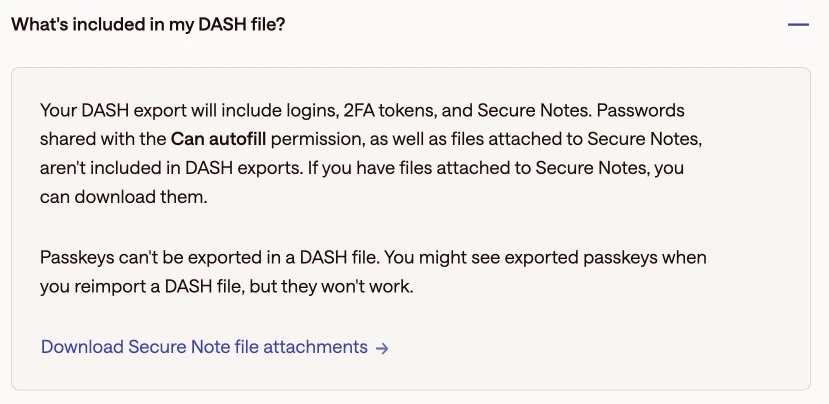
Attachments
A .dash has a Files section alongside its Data section, and
it is always empty. Dashlane leaves files attached to Secure Notes out of every export, which its
help article
confirms. The notes come through with no reference to the file, so download your attachments from
Dashlane before you close the account.
Dashlane metadata
Every record in the XML carries around twenty keys of Dashlane's own bookkeeping:
Id, SpaceId, LastBackupTime, LastUse,
Strength, AutoLogin, AutoProtected, TrustedUrl
and so on. None of it means anything outside Dashlane. The timestamps are the exception: CreationDatetime and the modification dates let an imported entry keep its
real age. The CSV export has none, and a vault moved by CSV arrives looking as though every entry
was created today.
CSV formats
The five files
The ZIP contains one CSV per category:
credentials.csv    logins          username2 and password
securenotes.csv    notes           only title, note and category
payments.csv       cards, banks    routing_number, plus a type column that splits them
ids.csv            ID documents    place_of_issue
personalInfo.csv   addresses etc   first_name with item_name
The right-hand column is what identifies each file once the archive has been unzipped and a single
file handed over, which is the common case. Secure notes have no distinctive column, so they are
recognized by having nothing else: current exports write title,note,category, and
older ones only title,note.
Reading by name
Read these by column name, never by position. Dashlane has already renamed a column once:
otpUrl replaced otpSecret, and both are still out there. A file with a
column you do not recognize should cost you one field, not shift an entire row.
personalInfo.csv is the odd one. Every type Dashlane files under personal information
(addresses, identities, emails, phone numbers) shares one very wide header, and each row leaves
blank the columns that do not apply to it. The only way to read a row is by what it happened to
fill in.
Cut down from 24 columns to 13, four rows of four different types:
type,title,first_name,last_name,email,email_type,item_name,phone_number,address,city,zip,job_title,url
name,MS,Jane,Doe,,,,,,,,,
email,,,,jane@example.com,personal,,,,,,,
number,,,,,,Mobile,+1 555 0100,,,,,
address,,,,,,Home,,1 Main St,Springfield,12345,,
The type column is the only thing saying which columns a row uses, and
title is a form of address, not the entry's name. That comes from
item_name, when there is one.
Sentinel values
Where you left a picker empty, Dashlane writes a placeholder of its own instead of leaving the value blank:
noCategoryin a category column means no category.UNIVERSALin a country column means no country.NO_TYPE, andUS-NO_TYPEin a card's bank field, mean nothing was chosen.PAYMENT_TYPE_VISAis a card brand, and only exists in the.dash.
Import them literally and you get a vault full of entries tagged noCategory and cards
issued by a bank called US-NO_TYPE.
Buddy field mapping
Secure Export
CSV
The ZIP and a single unzipped CSV share one set of columns.
Buddy is a desktop password manager for macOS and Windows that imports these files. If your export looks different from what this page describes, tell us. Other managers are on the export formats page.